Category: Articles

Longer reads on Ai for UK business.

  • Claude doubled your Cowork usage until 5 July. The question is what you run in it

    Claude doubled your Cowork usage until 5 July. The question is what you run in it

    From 5 June to 5 July 2026, Claude Cowork usage limits are doubled. It costs nothing and it is automatic. A bigger limit is good news. It is also the easiest part. Here is what the promotion is, in plain English, and the more useful question it raises for your business.

    What the promotion is

    For one month, from 5 June to 5 July 2026, your five-hour usage limit in Claude Cowork is doubled. Claude caps how much you can run in any five-hour stretch before a short pause. For this month that ceiling is twice as high, so you can run about twice as much work in a sitting. Your weekly limit has not changed, and nothing changes about your plan or your bill.

    You do not have to do anything to get it. If you are on Claude Pro, Max or Team, or a legacy seat-based Enterprise plan, the higher limit is already on your account. Free plans and consumption-based Enterprise seats are not included. The increase applies to Cowork only. Your limits in Claude on the web, desktop and mobile, and in Claude Code, are unchanged. The promotion ends on 5 July 2026, US Pacific time, and limits return to normal.
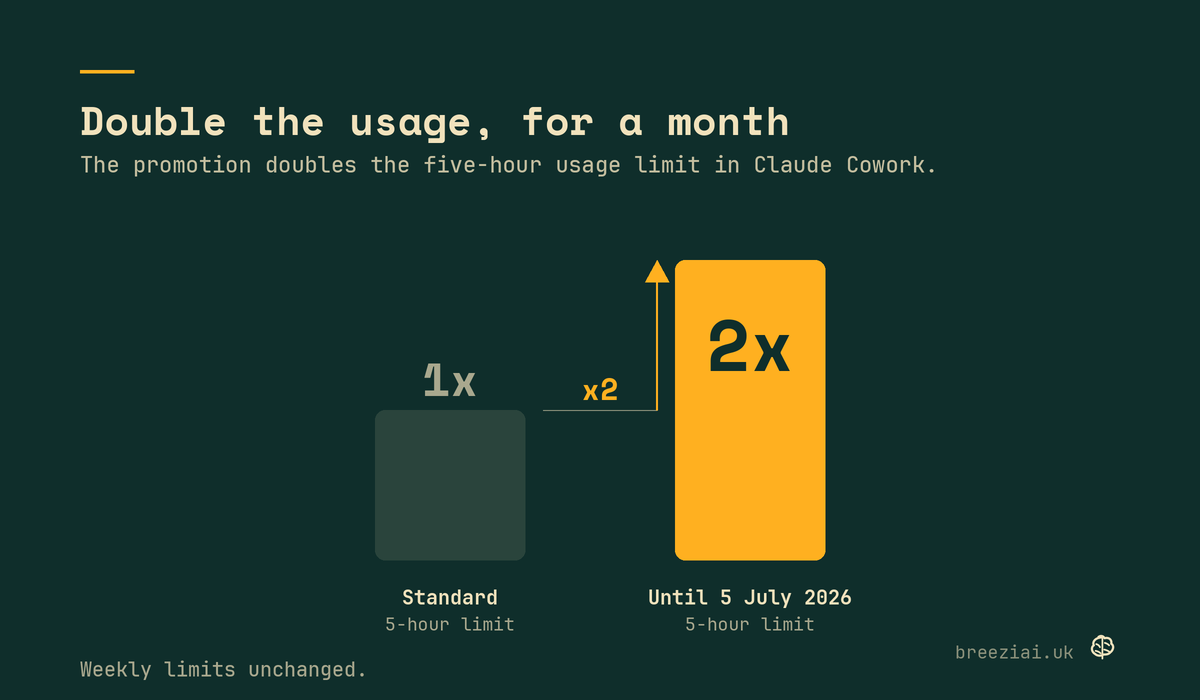
    Bar chart showing the five-hour usage limit in Claude Cowork doubled until 5 July 2026. Weekly limits unchanged.
    The promotion doubles the five-hour usage limit in Claude Cowork. Weekly limits are unchanged. Source: Anthropic, Claude Cowork June 2026 usage promotion.

    What Cowork is, if you have not opened it

    If you mostly know Claude as a chat window, Cowork is the other half. It is the part of Claude built to do the work rather than just describe it: open your files, build the spreadsheet, draft the documents, sort the folder, run the task start to finish. It is made for people who are not developers, which is most business owners. The five-hour limit matters more here than in chat, because real work, the kind that reads a folder of files or builds something end to end, uses more of it. That is the limit this promotion doubles.

    A bigger limit is only worth something if you are running something

    Here is the part the promotion does not solve. Twice the room to run Ai is worth nothing if you have not built anything worth running. A doubled ceiling on an empty workflow is still nothing doubled.

    Most business owners using Claude treat it like a search box: a question here, a draft there, a one-off when they remember. That is fine, and it is also where most of the value leaks away. The extra month only pays you back if you point it at real, repeating work in your business, the jobs that eat your week whether you feel like doing them or not.

    The gap the extra usage does not close

    The numbers make the point. 64% of UK organisations now say they use Ai in some form, up from 52% a year ago. Only 24% have reached advanced use, where Ai is actually part of how the business runs and makes decisions, and that figure rose by a single percentage point last year. Plenty of businesses have opened the tools. Very few have wired them into the work.
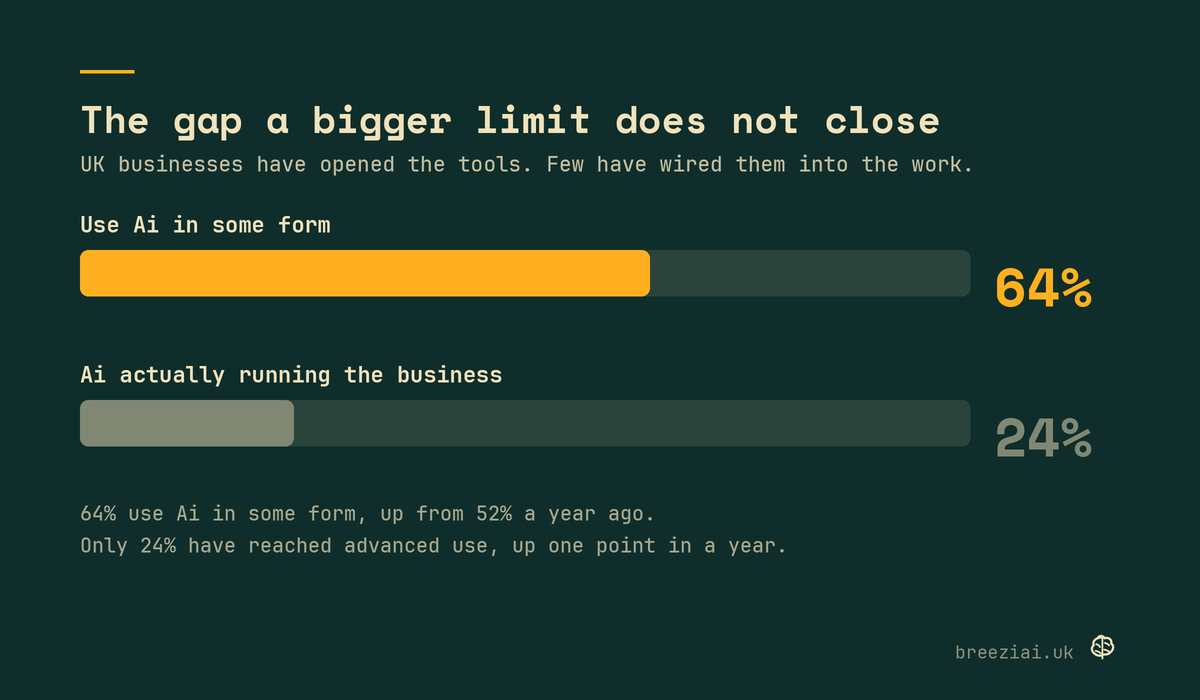
    Bar chart: 64% of UK organisations use Ai in some form, only 24% have reached advanced use.
    Sources: AWS and Strand Partners (April 2026), British Chambers of Commerce (March 2026), UK Government DSIT (February 2026), McKinsey (2025).

    A higher usage limit does not move you from the first number to the second. The thing that moves you is sitting down with your actual work, the reporting, the quoting, the inbox, the admin, and building the prompts and workflows that do that work the same way every time. The tool is the engine. Most businesses are still missing the wiring.

    How to use the month well

    You do not need a strategy. You need one or two real jobs and a bit of focus. Pick something you do every week that you resent doing: the Monday report, the quote you rewrite from scratch each time, the inbox you triage by hand, the first draft of the same kind of document. Build it once in Cowork, properly, so it runs the same way next week without you starting over. Then build the next one.

    The doubled limit helps here for a simple reason. Building a workflow well takes more back and forth than dashing off a single answer. For a month you have the room to do that building without hitting a pause halfway through.

    Where Breezi fits

    That building is the whole of what we do. Membership gives you bespoke hours with a senior Ai team every month: you bring the job, we build the prompt, the workflow or the automation that handles it, and you keep it. Lahat Creative, a UK marketing agency, reclaimed up to 30% of their working hours every month doing exactly that. Consultancy does the same at the scale of a team, a department or a whole organisation, with design, training and certification, the way one of our founders did inside a global financial platform.

    The free month is a good reason to start now. A doubled limit lasts until 5 July. A workflow that runs the parts of your business you never have time for lasts a lot longer. We help UK businesses actually use Ai, and this is a cheap month to begin.

    Ready to put the month to work?

    Bring us one job that eats your week. We build the workflow that handles it, and you keep it.

    MembershipConsultancy
  • Claude Opus 4.8 is here. What actually changes for your business

    Claude Opus 4.8 is here. What actually changes for your business

    Anthropic released Claude Opus 4.8 on 28 May 2026. It is their most capable model, and it now sits inside Claude and Cowork. If you use Claude for work, you are already on it. Here is what is new, in plain English, and the part most of the coverage will skip: a better model does not fix how Ai gets used inside a business.

    The short version

    Opus 4.8 is an upgrade on Opus 4.7. Anthropic describes it as a modest but tangible improvement, not a reinvention. It scores higher across Anthropic’s benchmarks for coding, reasoning, and knowledge work, and it runs at the same price as the version before it. For most people the day-to-day difference is two things: it is more honest about its own work, and you now get a dial that controls how hard it thinks.

    How it compares

    Anthropic’s own benchmark figures, set against Opus 4.7 and the latest models from OpenAI and Google. Opus 4.8 leads on five of the six. GPT-5.5 still wins on terminal coding, which is worth being straight about.

    BenchmarkOpus 4.8Opus 4.7GPT-5.5Gemini 3.1 Pro
    Agentic codingSWE-Bench Pro69.2%64.3%58.6%54.2%
    Agentic terminal codingTerminal-Bench 2.174.6%66.1%78.2%70.3%
    Multidisciplinary reasoningHumanity’s Last Exam, with tools57.9%54.7%52.2%51.4%
    Agentic computer useOSWorld-Verified83.4%82.8%78.7%76.2%
    Knowledge workGDPval-AA score1890175317691314
    Agentic financial analysisFinance Agent v253.9%51.5%51.8%43.0%

    Source: Anthropic, Introducing Claude Opus 4.8. GDPval-AA is a score, not a percentage. Reasoning row shows the with-tools result.

    Watch

    It owns up when it is not sure

    The change worth your attention is honesty. Ai models have a habit of sounding confident when they should not. They claim a task is done, or that code works, when the evidence is thin. That is the behaviour that quietly costs you time, because you trust an answer that was never checked.

    Anthropic trained Opus 4.8 to flag uncertainty instead of papering over it. In their own evaluations the model is around four times less likely than Opus 4.7 to let a flaw in code it has written pass without comment. It also scores far lower on Anthropic’s measure of misaligned behaviour, close to Mythos Preview, their best-aligned model.

    Misaligned behaviour

    Score 1 to 10 · lower is better

    2.58
    Sonnet 4.6
    1.78
    Mythos Preview
    2.48
    Opus 4.7
    1.83
    Opus 4.8

    Rebuilt from Anthropic’s alignment chart. Opus 4.8 scores far lower than Opus 4.7 and lands close to Mythos Preview, Anthropic’s best-aligned model. Figures read from the published chart and are approximate.

    For a business that matters more than any benchmark. The risk with Ai was never that it could not write the email or the report. It was that it would write the wrong one with total confidence and you would not notice until it reached a client. A model that says “I am not certain about this part” is a model you can actually delegate to.

    You now control the effort

    The second change is a new control in Claude and Cowork, available on every plan. Next to the model selector you can choose how much effort Claude puts into a response.

    Turn it up and Claude thinks more, more often, for a better answer on a hard problem. Turn it down and it replies faster and uses your limits more slowly for the quick stuff. Opus 4.8 defaults to high, which Anthropic judges the best balance for most work, with “extra” and “max” settings above that for difficult or long-running tasks.

    In practice this is a small habit, not a feature you need to study. Drafting a quick reply, summarising a document, tidying a list: leave it low and move on. Building a pricing model, working through a thorny contract, planning a launch: turn it up and let it take the time. The dial is there when you want it.

    What to ignore

    Here is the part the launch-day coverage tends to bury. The version number is not the thing standing between your business and useful Ai.

    The numbers say so plainly. 64% of UK organisations now say they use Ai in some form, up from 52% a year ago. But only 24% have reached advanced use, where Ai is actually part of how the business runs and makes decisions, and that figure rose by a single percentage point last year. The models have moved fast. Adoption inside real businesses has barely moved at all.

    That gap does not close because Opus went from 4.7 to 4.8. It closes when someone sits down with your actual work, the reporting, the admin, the email, the quoting, and builds the prompts and workflows that do that work the same way every time. The model is the engine. Most businesses are still missing the wiring.

    So enjoy the upgrade. It is free, it is already in your account, and it is genuinely better at telling you when it is unsure. Then ask the more useful question: what in your week could this actually take off your plate, and who is going to build that with you.

    Where Breezi fits

    Membership gives you bespoke hours with a senior Ai team every month: you bring the problem, we build the prompt, the workflow, or the automation that handles it. Lahat Creative, a UK marketing agency, reclaimed up to 30% of their working hours every month doing exactly that. Consultancy does the same at the scale of a team, a department, or a whole organisation, the way one of our founders did inside a global financial platform. A new model is a good day. A model that quietly runs the parts of your business you never have time for is the point.

  • Tuesday Memo 01: Why most UK businesses are using ChatGPT backwards

    Tuesday Memo 01: Why most UK businesses are using ChatGPT backwards

    Tuesday Memo · 12 May 2026 · Issue 01

    Why most UK businesses are using ChatGPT backwards.

    If your Ai output sounds robotic, the problem is not the tool. It is the way the question is being asked. Three useful Ai things this week, three minutes to read, no pitch in the body.

    Most UK business owners we speak to have a ChatGPT subscription, used it twice, and concluded it does not work for them. The tool is fine. The way they are using it is the problem. The fix takes 30 seconds to understand and pays off forever.

    ──── One thing worth your time ────

    Anthropic’s prompt engineering guide. The two pages worth reading.

    Anthropic published a guide on prompt engineering that finally puts the most important advice on paper. It is around 3,000 words. The two pages worth reading are “Be clear and direct” and “Use examples.” If you do nothing else with Ai this week, read those. The principle behind both is the same: stop asking Ai to do work blind. Start giving it the same context you would give a new hire.

    Link: docs.anthropic.com/prompt-engineering

    ──── One prompt to try ────

    Customer email replies that do not sound robotic.

    Most owners give ChatGPT a customer message and ask for a reply. The reply sounds like it was written by ChatGPT. The fix is not a better prompt. It is giving the model the context it needs to sound like you. Try this on your next customer email this week.

    Reply to this customer email.
    
    Customer message:
    [paste their message here]
    
    Context for the reply:
    - This customer has been with us for [X] years
    - They have raised this same issue [once before / never]
    - Our policy on [refunds / scope / extensions] is [paste your real policy]
    - Our tone is warm, direct, does not grovel
    - The reply needs to acknowledge the issue, give a concrete next step, and not [promise X / over-commit]
    
    Write the reply in 4 short paragraphs. Sign off as [your name].

    The thing that makes this work is the policy line. Paste your real policy in word-for-word. The output goes from generic Ai voice to your voice in the first try.

    ──── One thing to ignore ────

    The “Ai tool of the week” content cycle.

    This week alone we saw three “must-try” Ai tools that are last year’s tools renamed, plus four “Ai agents that will replace your team by Christmas” pieces. None of it is worth your time. The signal is small: roughly one or two genuinely new Ai categories appear per quarter. The rest is repackaging. Get good at the tool you already pay for before chasing the next one.

    ──── ────

    That is it for this week. Try the prompt above on a real customer email. If it lands, save it for next week. If it does not, hit reply and tell us why. We read every one.

    If you want a senior Ai team to build context-rich prompts for your specific business across email, reporting, admin, marketing and the rest, that is what Breezi Membership is for. From £89 a month.

    Jay at Breezi AiFounder · Breezi Ai · breeziai.uk
  • Ai for accountants: how UK accountancy firms use Ai to save hours every week

    Ai for accountants: how UK accountancy firms use Ai to save hours every week

    AI for professionals · Accountancy

    Ai for accountants.

    Where Ai actually fits in a UK accountancy practice, the workflows worth automating first, and how to use it without breaking client trust.

    5+

    Hours back per week · Per partner

    Most UK accountancy firms have tried ChatGPT once or twice for client emails and stopped there. This guide is for the practice manager, partner, or owner who wants to know what Ai is actually for in an accountancy practice in 2026. The answer is not what most “Ai for accountants” articles say.

    Members of Breezi Membership get the editable prompts and Custom GPTs for the workflows below. The detail is the thinking. The work is in the templates.

    What is Ai actually good for in an accountancy practice?

    Five real things. Drafting client emails and responses in your firm’s tone. Summarising long documents (HMRC guidance, complex contracts, due diligence packs) into useful briefings. Pre-categorising bookkeeping queries. Drafting first-pass advisory memos. Triaging shared inbox traffic. Across these five, a typical UK practice partner saves five to eight hours a week. None of this replaces partner judgement. All of it removes the friction around partner judgement.

    What should an accountancy firm NOT use Ai for?

    Tax advice. Client-facing audit conclusions. Anything that touches HMRC liability. Anything where the firm is acting as the regulated professional. Ai can draft, summarise, and triage. It cannot bear the professional risk. The firms that get into trouble are the ones that confuse the two.

    How do I keep client data safe when using Ai?

    Three rules. First, use the paid tiers of ChatGPT or Claude — they do not train on your inputs in business contexts. Second, never paste raw client data with personally identifying details into a public chat. Use anonymised versions or your firm’s approved Custom GPT that runs in a controlled environment. Third, write a one-page Ai policy that names what is and is not approved (we covered the template structure in this guide). The risk is not the tool. The risk is the workflow.

    The five Ai workflows worth setting up first in a UK accountancy practice

    1. Client email triage and draft replies

    Most practice email is patterns. New enquiry, deadline question, scope query, polite no on out-of-scope work, late-fee reminder. Build a prompt that knows your firm’s tone and policy. New email arrives, drafted reply waits in your drafts folder. You add the partner-level edit in 30 seconds.

    2. HMRC and regulatory guidance summaries

    HMRC publishes long technical guidance. So does the FRC, so do the institutes. Most of it is 80% irrelevant to any given client. Build a prompt that takes a piece of guidance plus a client profile and produces “what changes for you” in three paragraphs.

    3. First-draft advisory memos

    Client question comes in, you research, you write the memo. The research is fast for you, the writing is slow. Reverse that. Ai drafts the structure and the framing language from your bullet points, you write the technical content. A 90-minute memo becomes a 30-minute one.

    4. Document review triage

    Due diligence packs, contracts, board minutes. Long documents you need to read before saying anything useful. Ai summarises into three themes, the standout flag per theme, and what to investigate next. You then read the parts that matter rather than all 80 pages.

    5. Bookkeeping query categorisation

    Shared inbox fills up with bookkeeping clarifications from clients. Most have predictable categories: “is this expense allowable”, “how do I categorise this transaction”, “what date does this fall under”. A Custom GPT trained on your firm’s standards classifies and drafts replies. Junior staff review and send.

    Should small UK accountancy firms adopt Ai before the big ones do?

    Yes. The smaller the firm, the bigger the relative gain. A 4-partner firm where each partner saves 5 hours a week is 20 hours back. That is half a fee earner. A Big Four firm with the same per-person saving has it absorbed into reporting overhead. The firms that get the most from Ai in 2026 are not the biggest. They are the 2 to 50 person practices that move fast.

    How Breezi helps accountancy firms adopt Ai

    Breezi Membership gives you dedicated bespoke hours every month with a senior Ai team to design and embed the workflows above for your specific firm. Members get access to the prompt, guide, and Custom GPT library across hospitality, marketing, finance, sales, operations, logistics, data analysis and legal — including the accountancy-specific entries. From £89/month. For larger firms or partner-wide rollouts, Breezi Consultancy handles practice-wide implementations.

    Next steps

    Pick one workflow from the five above. Spend 30 minutes describing it in writing. Take that description to ChatGPT or Claude and ask it to design a prompt that handles it for your firm. Run it for a week. If it saves an hour, scale it. If you want a senior Ai team to skip the iteration phase and build it with you, start with Membership from £89/month, or subscribe to the Tuesday Memo for one useful Ai thing every Tuesday, free.

  • How to write an Ai policy for your business: a plain English template for UK SMEs

    How to write an Ai policy for your business: a plain English template for UK SMEs

    AI for business · Policy

    How to write an Ai policy for your business.

    Plain English Ai policy template for UK SMEs. Six sections, ready to adapt, no legal jargon. Plus what to leave out and how to make it stick.

    06

    Sections · Plain English

    Most Ai policies are written by lawyers for other lawyers. This is a plain English Ai policy template for UK small businesses, written for the owner who needs the policy to actually shape behaviour rather than sit in a folder.

    Members of Breezi Membership get the editable Word and PDF versions in the policy library, along with templates for data handling, customer-facing disclosure, and prompt logging. The full template below is free to use as-is.

    Why does my business need an Ai policy?

    Three reasons. To set expectations so the team knows what is and is not OK. To protect the business from data leaks and reputational risk. To make Ai adoption easier, not harder, by removing the question “am I allowed to use this for that?” before it slows anyone down. The policy is permission, not prohibition.

    The six sections every UK SME Ai policy needs

    1. What Ai we approve

    Name the specific tools you have approved (ChatGPT Plus, Claude Pro, Microsoft Copilot, whichever). Say what each is approved for. “Approved for general drafting, summarising, and analysis. Not approved for storing customer personal data.”

    2. What never goes into an Ai tool

    Be specific. Customer payment details. Employee personal data without consent. Confidential commercial terms with named third parties. Health information. Legal documents under privilege. Anything you would not paste into an email to your local newspaper.

    3. How to disclose Ai use to customers

    Be honest. If a substantial proportion of the work was Ai-drafted and a human did not fundamentally rewrite it, the customer needs to know. The line UK customers accept is “Ai-assisted, human-reviewed.” The line they push back on is silence when they later realise.

    4. Who is accountable

    Name a person, not a role. “Sarah owns Ai use in the business. Bring questions to her.” This solves the “I did not know I needed to ask” problem before it happens.

    5. How we log and review

    The minimum is a shared sheet listing the prompts and workflows the team uses regularly. Reviewed quarterly. This sounds bureaucratic but does two jobs at once: catches problems early and makes Ai adoption faster because the team is not reinventing the same prompt every week.

    6. What to do if something goes wrong

    The single most important section. If Ai produces something that turns out to be wrong, defamatory, or contains data that should not have been included, here is what you do: stop using that prompt or workflow, tell the named owner, document what happened, decide whether to inform anyone external. One paragraph. Clear actions.

    What should I leave out of an Ai policy?

    Definitions of Ai. Lists of every possible tool. Legal disclaimers. Generic risk language. The policy gets ignored if it reads like it was copied off another company’s website. Keep it under one page, written in the voice your team actually talks in. If it does not fit on one page, it is not a policy, it is documentation.

    How do I make an Ai policy actually stick?

    One 30-minute team meeting to walk through it. A pinned message in the shared workspace. A quarterly review on the calendar. The policy is not the work. The conversation is the work.

    What Breezi Membership adds

    Members get the editable Word + PDF policy template, plus templates for data handling, customer disclosure, and prompt logging across hospitality, marketing, finance, sales, operations, logistics, data analysis, and legal. Members also get dedicated bespoke hours every month with a senior Ai team to adapt the policy to your specific business. From £89/month.

    Next steps

    Take the six sections above. Adapt them to your business in plain English. Set a quarterly review date. Pin it somewhere the team will see it. If you want the editable templates plus a senior Ai team to help you embed it, start with Membership from £89/month, or subscribe to the Tuesday Memo for one useful Ai thing every Tuesday, free.

  • Claude vs ChatGPT for business: which one should UK SMEs use in 2026?

    Claude vs ChatGPT for business: which one should UK SMEs use in 2026?

    AI for business · Comparison

    Claude vs ChatGPT for business.

    An honest side-by-side for UK SMEs in 2026. What each one is better at, what each one costs, and why most owners benefit from running both.

    VS

    Claude · ChatGPT · 2026

    Claude and ChatGPT are the two Ai tools UK small businesses are most likely to use in 2026. They are both excellent. They are not the same. This guide is the honest side-by-side for owners deciding which one to subscribe to, written from the perspective of running real workflows in real businesses.

    If you want a senior Ai team to configure either tool for your specific business, that is what Breezi Membership exists for. The detail below is the thinking behind the decision.

    What is the short answer?

    Claude is better at careful writing, long documents, and any task where tone matters. ChatGPT is better at fast everyday work, voice mode, plugins, and image generation. Most UK business owners we work with end up running both at £38/month total and switching by task.

    When should I use Claude over ChatGPT?

    Claude when you care about voice, tone, and the careful structure of writing. Drafting a sensitive customer reply, writing a careful contract clause, summarising a 50-page document into three paragraphs, rewriting a paragraph that sounds robotic — Claude is the better tool. The output reads like an editor has been over it. ChatGPT output reads like a draft.

    When should I use ChatGPT over Claude?

    ChatGPT when you want speed, when you want image generation, when you want voice mode for hands-free use during a commute or a school run, when you want to upload a spreadsheet and have it analyse the data quickly. ChatGPT also has a wider plugin ecosystem and is generally the better tool for any work that needs to integrate with other systems.

    Which one is better at writing?

    Claude, by a small but consistent margin. The difference shows up most clearly on tasks longer than 200 words, on anything that needs a specific voice or tone, and on any content that will be read by a customer or stakeholder rather than processed internally. ChatGPT writes fine for internal work. Claude writes well enough to publish with light editing.

    Which one is better for data analysis?

    ChatGPT, especially with file uploads and code execution. Paste a CSV, ask three questions, get a useful first cut. Claude can do the same with smaller files and reasoning-led analysis, but ChatGPT’s analytics tooling is more developed in 2026.

    How much does Claude cost in the UK?

    £18 per month for Claude Pro. £20 per month for ChatGPT Plus. Both have free tiers, but the paid tiers unlock the better model, file uploads and higher rate limits. For a UK business owner using either tool more than twice a week, the £18-20 pays for itself the first time it saves an hour.

    Is it worth paying for both Claude Pro and ChatGPT Plus?

    For most UK SME owners doing more than basic Ai work, yes. £38 a month is genuinely small in business terms, and the friction of switching by task is far lower than the friction of forcing one tool to do work it is not best at. The pattern most of our members settle on is Claude for outbound writing and careful work, ChatGPT for everyday admin, analysis and quick drafting.

    How does Breezi Membership help with this?

    The tools are the easy bit. Configuring them for your specific business, building the context blocks that get useful output, and connecting the workflows is the harder bit. Breezi Membership gives you dedicated bespoke hours every month with a senior Ai team to do exactly that. Members get access to a library of prompts across both Claude and ChatGPT, plus Custom GPTs and policy templates for hospitality, marketing, finance, sales, operations, logistics, data and legal.

    Next steps

    Subscribe to ChatGPT Plus and Claude Pro for the first month. £38 total. Use Claude for any writing that matters and ChatGPT for everything else. After two weeks you will know which one you reach for. If you want a senior Ai team to set up the prompts and workflows that make either tool work in your specific business, start with Membership from £89/month, or subscribe to the Tuesday Memo for one useful Ai thing every Tuesday, free.

  • Ai automation for small businesses: what to automate first (with real examples)

    Ai automation for small businesses: what to automate first (with real examples)

    AI for business · Automation

    Ai automation for small businesses.

    The four workflows worth automating first in a UK small business. Real examples, the order to do them in, and what 30% of hours back looks like in practice.

    30%

    Of hours back · Lahat Creative

    Most articles on Ai automation for small businesses describe the technology. This one describes the work. Specifically: the four workflows that pay off fastest when you automate them, the order to do them in, and what 30% of working hours back actually looks like inside a UK marketing agency that has done this with us.

    If you want a senior Ai team to do this work with you instead of figuring it out alone, the Membership page is the starting point.

    What is Ai automation for a small business?

    Ai automation means letting Ai do a task end to end, without a human doing the manual work each time. Three pieces: a trigger (new email, form submission, schedule), an Ai step (drafting, summarising, classifying), and an action (saving the output, sending a reply, updating a system). For most small businesses, that is the whole stack.

    What should a small business automate with Ai first?

    The first thing to automate is whichever weekly task eats the most senior time and has the most predictable structure. For agencies and service businesses, that is usually client reporting. For e-commerce, it is order communication and review triage. For consultants and freelancers, it is customer email replies. For most businesses, the answer is reporting.

    The four workflows worth automating first

    1. Client and internal reporting

    The structure is repetitive. The data changes monthly. Build a prompt that pulls data from your sources, applies your template, and writes a narrative in your tone. A two-hour report becomes a 20-minute review. Real example from Lahat Creative: agency reporting shortened from hours to minutes after Breezi embedded a custom prompt and a Make.com flow.

    2. Customer email triage and replies

    New enquiry comes in → Ai classifies it, drafts a reply in your tone, and queues it in your drafts folder. You edit and send in 30 seconds. Saves an hour a day for most owners. The Ai never sends without you, so the policy stays intact.

    3. Meeting notes and follow-up

    A meeting note tool (Granola or Fireflies) captures the call, writes the summary, extracts action items, and drafts the follow-up email. You add the personal touch in 60 seconds. The post-call admin that used to take 20 minutes per meeting is now near-zero.

    4. Internal document and policy triage

    Customer feedback dump, survey results, contract drafts. Paste in the long document, ask for the three themes, the standout quote per theme, and what to investigate next. You get a usable first cut in two minutes.

    What does Ai automation actually save?

    For a UK marketing agency the size of Lahat Creative, the answer is up to 30% of working hours every month. That number is real, comes from real work, and is published as a Member story on the site. For a solo operator, the saving is typically four to eight hours a week. For a small team, multiply by people.

    What tools do I need for Ai automation in a small business?

    A conversational Ai (ChatGPT Plus or Claude Pro). An automation tool to connect things (Make.com, n8n, or Zapier). A meeting note tool if you run calls (Granola or Fireflies). Total monthly cost for most small businesses is £30 to £60. The cost of the senior Ai person who configures it for your specific business is the bigger line — and the line that returns the most.

    How Breezi helps with Ai automation

    Membership from £89/month gives you dedicated bespoke hours every month with a senior Ai team to design and embed the workflows above in your specific business. You bring the task. We design the prompt, set up the automation, write the policy, and document it so the work survives any team change. For larger teams or whole-department rollouts, Breezi Consultancy handles enterprise-grade implementations.

    Next steps

    Pick the workflow that eats the most of your week. Spend 30 minutes describing it in writing. Take that description to ChatGPT and ask it to design a prompt and an automation flow that does the work. Iterate. If you want a senior team to skip the iteration phase, start with Membership from £89/month, or subscribe to the Tuesday Memo for one useful Ai automation every Tuesday, free.

  • The best Ai tools for freelancers in 2026 (and three to skip)

    The best Ai tools for freelancers in 2026 (and three to skip)

    AI for freelancers · Honest picks

    The best Ai tools for freelancers in 2026.

    The tools UK freelancers actually use day to day, what each one is for, and the three popular picks that are not worth the money.

    07

    Picks · No affiliate fluff

    Most “best Ai tools for freelancers” lists are affiliate spam. This is not one of those. The list below is the tools UK freelancers actually use in 2026, what each one is good for, and three popular picks worth skipping.

    If you want a senior Ai team to set these up specifically for your business, that is what Breezi Membership exists for. The list below is the starting kit.

    What Ai tools do freelancers actually need?

    Three categories. A conversational Ai (ChatGPT or Claude) for writing, replies, first-draft analysis. An automation tool (Make.com or n8n) to connect things you already use. A specialist tool or two for the work you do specifically — design, video, audio, code. Most freelancers do not need more than three or four Ai tools running at once.

    The seven Ai tools worth your money

    1. ChatGPT Plus (£20/mo)

    The workhorse. Customer emails, reporting, first drafts, analysis. Pays for itself in the first hour it saves.

    2. Claude Pro (£18/mo)

    Better than ChatGPT for long documents, careful writing, and any task where tone matters. Many freelancers run both and switch by task.

    3. Make.com (free tier, scales to £8+)

    Connects the tools you already use. New enquiry comes in → drafted reply hits your inbox automatically. Form submission → CRM update + Slack alert. The free tier covers most freelancer use cases.

    4. Loom Ai (£12.50/mo)

    Record a 90-second video. Loom Ai writes the transcript, generates a summary, and sends an automated follow-up email. Cuts post-call admin to zero.

    5. Canva Magic Studio (included in Pro £10.99/mo)

    Resize, restyle and recolour a single asset for ten different placements in one click. The Magic Switch feature alone saves freelance designers and marketers an hour per project.

    6. Granola or Fireflies (free tiers available)

    Meeting notes. Records the call, transcribes it, writes the summary, extracts the action items. The single biggest weekly admin win for any freelancer who runs client calls.

    7. Cursor (£15/mo, if you write any code)

    Only relevant if you build websites, automations, or anything technical. If you do, Cursor changes the maths on what a one-person freelancer can ship.

    What Ai tools should freelancers avoid in 2026?

    Three. All-in-one Ai dashboards that promise to replace ChatGPT, Claude and ten other tools at once. They never do, and the value sits in the underlying models you can subscribe to direct. Ai content generators that promise to write your blog or social calendar on autopilot. Output reads like Ai content because it is Ai content. Image generators bundled into productivity suites. The standalone tools (Midjourney, Flux, Ideogram) are dramatically better.

    How much should a freelancer spend on Ai tools per month?

    £30 to £80 covers most freelancers well. The two foundational subscriptions (ChatGPT Plus + Claude Pro) come to £38. Add one specialist tool for the kind of work you do, and you are at the right level. Spending more than £100/month is usually a sign of unnecessary tools rather than a more capable setup.

    What Membership adds to the tool stack

    The tools are the easy bit. The hard bit is configuring them for your business, building the prompts that get useful output, and connecting the workflows. Breezi Membership gives you dedicated bespoke hours every month with a senior Ai team to do exactly that. From £89 a month.

    Next steps

    Start with the two foundational subscriptions (ChatGPT Plus and Claude Pro) for the first month. Add a meeting note tool. That is the freelancer Ai kit at its leanest. If you want to skip the setup and have us configure everything for your specific business, start with Membership or subscribe to the Tuesday Memo for one useful Ai thing every Tuesday, free.

  • How to use ChatGPT for business: a UK owner’s plain English guide

    How to use ChatGPT for business: a UK owner’s plain English guide

    AI for business · Plain English

    How to use ChatGPT for business.

    A UK owner’s plain English guide. The four ways ChatGPT actually saves time in a real business, and the mistakes that waste it.

    01

    Starter guide · Membership

    Most UK business owners have tried ChatGPT once or twice. Most have not made it work for them. The tool is genuinely useful. The way most people approach it is the problem. This is the plain English guide to using ChatGPT for business, written for owners who do not have time to learn another tool.

    If you want a senior Ai team to do this with you instead of figuring it out alone, the Membership page is the starting point. The detail below is the thinking behind it.

    What is ChatGPT actually good for in a business?

    ChatGPT is good for any task that is repetitive, predictable in format, and where you already know what good looks like. Customer email replies. Monthly reporting. Subject line variants. First-draft copy. Meeting summaries. Triaging a long customer-feedback document. It is not good for strategic decisions, creative direction, or anything you cannot describe clearly to a junior person.

    How do I get ChatGPT to sound like my business?

    Context. Most “ChatGPT sounds robotic” complaints come from people who pasted a question with no information about their business, their tone, or their constraints. The fix is to give the model the same brief you would give a new hire: who the work is for, what good looks like, what to avoid. Once you have a context block that works, save it. Reuse it. The output gets sharper every time.

    The four functions where ChatGPT pays off fastest

    1. Reporting and admin

    Monthly client reports, weekly summaries, internal dashboards. The structure is repetitive, the data changes. Teach ChatGPT your template once and a two-hour report becomes a 20-minute one.

    2. Customer email replies

    Most owners spend an hour a day on emails that follow predictable patterns: new enquiry, scope question, polite no, late-payment chase. Build a prompt that knows your tone and your policies. Get a draft you can edit in 30 seconds.

    3. First-draft copy

    Not “write me a marketing plan”. Specific small tasks: rewriting a service description for a new audience, generating ten subject line options, drafting social copy for a campaign you already designed.

    4. First-draft analysis

    Paste a spreadsheet, a survey result, or a customer-feedback dump. Ask three things: what stands out, what surprised you, what to investigate next. You get a useful first cut in two minutes. You still make the decisions.

    What are the most common ChatGPT mistakes for business owners?

    Three. Asking for whole jobs instead of specific tasks. Giving no context about the business. Trying it once, getting a generic answer, concluding it does not work. All three are fixable by treating ChatGPT like a junior team member, not a calculator.

    Should I pay for ChatGPT Plus or use the free version?

    If you are using ChatGPT for business more than a couple of times a week, the £20/month Plus subscription pays for itself the first time it saves you an hour. Faster, smarter model, fewer rate limits, ability to upload documents. For a UK small business owner, this is the lowest-friction Ai investment available.

    How does Breezi Membership build on this?

    ChatGPT is the tool. Membership is the team that makes the tool work in your specific business. Members get dedicated bespoke hours every month with a senior Ai team, plus a library of prompts, guides, Custom GPTs and policies across hospitality, marketing, finance, sales, operations, logistics, data and legal. You bring the workflow. We design the prompt. From £89 a month.

    Next steps

    Pick one repetitive task you do every week. Spend 30 minutes writing a context-rich prompt for it. Test on this week’s task. If it works, that is one hour back forever. If you want a senior Ai team to do this with you, start with Membership or subscribe to the Tuesday Memo for one useful Ai thing every Tuesday.

  • How UK marketing agencies use Ai to reclaim up to 30% of working hours

    How UK marketing agencies use Ai to reclaim up to 30% of working hours

    Field guide · For marketing agencies

    How UK marketing agencies use Ai to reclaim up to 30% of working hours

    The five workflows that swallow agency hours, the ones Ai actually fixes, and the case study behind the 30% figure.

    30%

    Of hours back · Lahat Creative

    Most marketing agencies are already efficient. The wins from “tighten your operations” have been wrung out years ago. The next layer of margin comes from a different place: a senior Ai team embedded in your workflows, removing the friction nobody else has time to remove. This guide is for the agency owner or operations lead trying to figure out where Ai actually fits, and where it gets oversold.

    The headline outcome from the agency at the centre of this piece (Lahat Creative, a UK marketing agency) is up to 30% of working hours reclaimed every month. The full case study lives on the Membership page. The detail below is the thinking behind that number.

    The five workflows that swallow agency hours

    From running real engagements with UK agencies, the same five workflows show up as time sinks every time.

    1. Client reporting

    Monthly performance reports across paid, social, organic, and email. Pulling data from four platforms, reconciling it, writing the narrative, formatting to the agency template. Senior people often own this because the narrative matters; the formatting eats the hour.

    2. Internal admin

    Project setup, timesheets, scope-creep documentation, status updates to the account lead. These tasks are predictable, repetitive, and necessary. They cost an hour or two a day across the team.

    3. Email and customer responses

    New enquiries, scope questions, polite-no replies, scheduling, late-payment chases. Patterns repeat. Writing them from scratch every time is wasted senior time.

    4. First-draft copy

    The bit between the brief and the polished output. Caption options, headline variants, ad copy, blog drafts. Not the strategy. Not the final polish. The bit in the middle that takes an hour and a half and is recovered on the edit.

    5. Internal marketing

    The agency’s own marketing nearly always loses to client work. Newsletters drift. Social calendars stall. Case studies do not get written. The work is real but never urgent.

    Where Ai actually fits, and where it gets oversold

    The honest answer is that Ai does not replace senior judgement. It does not write strategy. It does not make the call. It also does not need to. The leverage in an agency is not “Ai does the strategy”. The leverage is “Ai removes the friction around the strategy”.

    Inside the five workflows above, Ai fits cleanly into: reporting (pulls data, formats narrative, applies your template); admin (drafts status updates, reconciles timesheets, structures scope-creep documentation); email (drafts replies in your tone with your policies); first-draft copy (generates ten options, you pick one and edit); internal marketing (writes the newsletter, drafts the case study, schedules the social). What does not fit cleanly: the agency’s strategic positioning, the creative director’s brief, the founder’s pitch. Leave those alone.

    The Lahat Creative breakdown

    Lahat Creative was already efficient before they joined Breezi Membership. They were not chasing efficiency for its own sake. They wanted a senior Ai team to look at the workflows quietly eating their week and remove the friction.

    Inside Lahat’s monthly bespoke hours, we briefed, built, and embedded a layer of Ai-assisted workflows that fit the agency’s existing way of working. Multiple custom prompts. Several automations. Email structures and response templates the team actually uses. Reporting and admin shortcuts. Internal marketing operations cleaned up.

    Specifically: reporting workflows shortened from hours to minutes; admin tasks automated where Ai could safely take over; email structures and customer responses standardised and accelerated; internal marketing operations tightened across the agency.

    The outcome: up to 30% of working hours reclaimed every month. That time goes back into client work and growth, not into time off. For an agency owner this is the commercial value of dedicated Ai support: a senior Ai team working alongside you on the workflows that actually compound, month after month.

    A starter prompt for agency reporting

    One concrete example you can use this week. The prompt below is the spine of an agency reporting workflow. Adapt it to your data sources, your template, and your tone.

    You are writing the monthly performance report for [client name] for [month].
    Data attached: [paste data — paid spend, results, social, email, organic].
    Our agency standards: write in plain English, lead with the result not the activity, name two things that worked and one that did not, suggest one thing to try next month.
    Length: 3 short paragraphs plus a numbered list of next month's priorities (max 5).
    Tone: confident, specific, no jargon.
    Reply with the report in our standard format.

    Run this prompt with your real data. It will not be 100% right on the first run. After two or three rounds of edit, you have a reusable template that handles the routine work and lets your account leads focus on the strategic part.

    How Membership compounds for agencies

    One workflow saves you an hour. Five workflows save you a day. Twenty workflows save you a week. Membership at the Standard or Pro tier is designed to keep adding workflows month after month. Your library of prompts, automations, and Custom GPTs grows. The agency runs lighter every quarter.

    The point is not that any one of these workflows is revolutionary. The point is that they compound. Three months in, a Lahat-style outcome (30% of hours back) is realistic for an already-efficient UK agency.

    Next steps

    If you run a UK marketing agency and the workflows above sound familiar, the Membership Standard or Pro tier is the right starting point. If you want to see the Lahat case study in detail first, it sits in the Member story section on the Membership page. If you would prefer to follow along before signing up, the Tuesday Memo ships three useful Ai things every Tuesday, free.