Category: Articles

Longer reads on Ai for UK business.

  • Canva Code 2.0: what it means for your small business

    Canva Code 2.0: what it means for your small business

    ARTICLE

    Canva Code 2.0 is here. What it means for your small business

    On 14 July 2026, Canva put its Ai website builder on every plan, including the free one. You describe a simple site or interactive tool in a sentence, and Canva builds it, ready to publish. Here is where it earns its place, and where it does not.

    On 14 July 2026, Canva launched Canva Code 2.0 to all of its users. In plain terms: inside the same Canva you already use for social posts, you can now describe a small website, landing page or interactive tool in plain English and have Canva build it for you, then publish it, even on the free plan.

    This is the news most coverage skips over: Canva Code is not a separate developer product you have to go and learn. It sits in the Canva you probably already have open, next to your presentations and Instagram templates. What changed on 14 July is that the newer, faster version stopped being a paid or invite-only feature and became available to everyone. That is what makes it worth three minutes of a busy owner’s time.

    What actually changed?

    Canva Code lets you build a working website or interactive page by typing what you want, rather than writing code or dragging every element by hand. This style of tool is often called “vibe coding”: you describe the result in plain language and the Ai produces the page. Canva Code 2.0 is the second version, and the announcement on 14 July 2026 made it available to free, pro, business, enterprise and education users, where before it was limited.

    You can start from a plain-language prompt, one of more than 50 new templates, or by importing raw HTML from another tool and turning it into something you can edit like a normal Canva design. The output is a real, responsive page that adapts itself to mobile, drawing on Canva’s library of over 120 million images and design assets. You edit it the Canva way: change the brand colours, swap the text, drag in an image, or ask the Ai to refine an element in conversation. When it is ready, you publish it to a free Canva web address or buy a custom domain without leaving Canva.

    Source: Canva, “Vibe coding that matches your vision: Canva Code 2.0 is now available to all”

    Is it any faster than before?

    Canva says yes, and puts numbers on it. By its own figures, Canva Code 2.0 cuts the average time to generate the code behind a page by 75%, and the median time from your first prompt to a published site by 30%. For context, Canva reports that its community has built more than 6 million sites since Canva Code first launched a year ago.

    Canva Code 2.0, by Canva’s own numbers

    How much faster version 2.0 is than the previous version. Longer bar means a bigger time saving. Source: Canva, 14 July 2026.

    Code generation75%
    Prompt to publish30%

    Does it cost extra?

    No. Canva Code 2.0 is available on the free plan as well as pro, business, enterprise and education. Buying a custom domain through Canva costs money, as domains always do, but publishing to a free Canva web address does not. So you can try the whole thing, from prompt to a live page, without paying anything.

    Do I need to be technical to use it?

    No. That is the point of it. You are describing what you want in ordinary English and editing the result with the same colour, text and image controls you already use in Canva. You never see or touch the underlying code unless you want to. If you can make a Canva social post, you can make a Canva Code page.

    What this means for your business

    Take a two-person wedding florist. They have wanted a simple “seasonal flowers this month” page with an enquiry form for a year, but a web developer quote made them stop. In Canva Code 2.0 they can describe that page in a sentence, drop in their own photos and brand colours, and publish it to a free Canva address the same afternoon. A local tutor could build a one-page “which course is right for me” quiz. A cafe could put up a simple seasonal menu page that actually looks like their brand.

    Cost and effort verdict: free to try on any plan, and minutes rather than days for something small. The honest caveat is that you still own what it says. Check the wording, prices and claims it generates, keep it to simple marketing pages, and do not use it for anything that has to be genuinely secure or take card payments. It builds the shop window, not the till.

    What to ignore

    Ignore the louder version of this story, the one that says tools like this mean you never need a web developer or a proper website again. For a simple landing page, a calculator, an FAQ or a seasonal one-pager, Canva Code is genuinely enough. For your booking system, your online shop, anything holding customer data, or a site that has to grow and rank over years, it is not a replacement, and treating it as one is how small businesses end up with a fragile page they cannot maintain. Use it for the quick, self-contained things, and keep the boring, important infrastructure where it belongs.

    What should a small business do next?

    Open Canva, look for Canva Code, and pick one small thing you have been meaning to build: a single landing page for one offer, a simple price or menu list, or a one-question quiz that sends you an enquiry. Describe it in a sentence, edit it into your brand colours, and publish it to the free web address. Half an hour will tell you whether it is good enough for the jobs you would actually give it. If you want related reading, our note on what Meta’s Ai image tools mean for your business and our guide to Ai that produces finished work both sit in the same “describe it, let the Ai build it” territory.

    Where Breezi fits

    A tool that builds a page for you is a good afternoon. A tool woven into the parts of your business you never have time for is the point. Membership gives you bespoke hours with a senior Ai team every month: you bring the problem, we build the prompt, workflow or automation that handles it, whether that is a Canva Code page you want done properly or something bigger. Lahat Creative, a UK marketing agency, reclaimed up to 30% of their working hours every month doing exactly that. Consultancy does the same at the scale of a team or a whole organisation, the way we did for the financial platform Uphold. We help UK businesses actually use Ai.

  • Meta’s Muse Image is here. What a free Ai image tool means for your business

    Meta’s Muse Image is here. What a free Ai image tool means for your business

    ARTICLE

    Meta’s Muse Image is here.
    What a free Ai image tool means for your business

    On 7 July 2026, Meta launched Muse Image, its first in-house Ai image generator, inside the Meta AI app, WhatsApp and Instagram. Everyday use is free. It builds a picture from a plain description and edits it by conversation, so a usable social graphic is minutes of typing rather than a design job.

    On 7 July 2026, Meta announced Muse Image, a new Ai image generator built by Meta Superintelligence Labs. In plain terms: you describe a picture in the Meta AI app, on WhatsApp or in Instagram, and it makes it, then lets you change it by asking, the way you would brief a person.

    The part most coverage skips is where this sits. Muse Image is not a separate app to download or a tool to pay for before you have tried it. It runs inside apps a lot of small businesses already open every day: the Meta AI app, WhatsApp and Instagram. Everyday creation is free. For an owner who has never touched a design tool, that lowers the bar to making a passable graphic to roughly the effort of sending a message.

    What actually changed?

    Meta now has its own image model. Muse Image is the first image generator from Meta Superintelligence Labs, and Meta describes it as working like an agent rather than turning a prompt straight into a picture: it can plan a multi-step edit, keep the same subject across changes, and pull in context from your conversation, an uploaded reference or a linked photo instead of treating each request as a blank slate. In practice that means you can say “make the sky lighter and move the logo to the corner” and it changes that, rather than generating a brand new image and losing what you liked. It can also render readable text inside an image, which older tools were bad at.

    Source: Meta AI, “Introducing Muse Image and Muse Video”

    What can you actually make with it?

    Quick visuals a small business needs and usually pays for or skips. A promotion graphic for an Instagram or Facebook post. A simple product mock-up from a photo you already have. A banner for an event. A first logo idea to react to. Meta lists more than 30 new effects for Instagram Stories, and on WhatsApp you can generate images inside a normal chat. Because you edit by describing changes, you can steer a result toward what you actually want instead of re-rolling from scratch and hoping the next one lands.

    Does it cost anything?

    Everyday creation is free. In Meta’s own words, “Using Meta AI with Muse Image is free for everyday creation. For people who want to create even more, it’s available as part of Meta’s subscription plans.” So the basic case, a few images for a post, costs nothing beyond the apps you already have. Heavy use pushes you toward a paid Meta AI plan, and Meta has not published the exact limits or prices for that. Treat the free tier as enough to test whether the tool is any good for your business before you think about paying.

    Can you use it in the UK?

    Check, because Meta has not confirmed a UK date. Meta says Muse Image is “now available in Meta AI” and rolling out across WhatsApp and Instagram, with Instagram Stories effects starting in the US and WhatsApp image chats in limited countries. Its own post says only that it will “bring Muse Image to more countries” soon. The Meta AI app is already available in the UK, so the quickest test is to open meta.ai or the Meta AI app and ask it for an image. If it generates, you have it. If it does not yet, this is a question of weeks, not a different product.

    What this means for your business

    Take a one-person coffee van that posts a Saturday-market offer most weeks. The graphic is the bit that never happens: no design tool, no budget, no time. With Muse Image, the owner opens WhatsApp or the Meta AI app, types “a bright square graphic for a market stall, coffee cup, Saturdays 9 to 2 in bold text”, and gets a usable draft to tweak in a couple of minutes. The same goes for a plumber wanting a clean van-livery mock-up, or a shop testing three poster ideas before paying a designer for the final one.

    Cost and effort: low, and free for everyday use. The honest caveat is that a free Ai image is a first draft, not a brand. It can still warp a small detail, get a hand wrong, or produce something generic. Use it for speed and volume, and put a human eye on anything that carries your name.

    The one setting worth checking

    If you or your business has a public Instagram profile, there is a control worth knowing about. Muse Image can use public photos as raw material for Ai edits, and that control is opt-out, not opt-in: it is on unless you turn it off. Meta’s own wording is that “you have control over how your content can be tagged for AI creation with an easy setting to turn this feature off at any time”. The pushback since launch, reported by TechCrunch on 7 July, is that people are not notified when their public images are used this way, so the responsibility sits with you to find the setting. If your brand photos or your own likeness are public on Instagram, take two minutes to review it.

    What to ignore

    Ignore the Muse Video preview for now. Meta announced it alongside Muse Image, but it is a preview “coming soon”, not something you can use today, so it is not worth planning around. Ignore, too, the framing that this replaces a designer. It makes a fast, cheap first image; it does not decide what your brand should look like, which colours are yours, or whether a poster actually reads. For a one-off social graphic it is genuinely useful. For anything that defines how your business looks, it is a starting point a person still has to finish.

    What should a small business do next?

    Open the Meta AI app or meta.ai and ask it for one real thing you need this week: a post graphic, a simple promo, a product mock-up. Time how long it takes against your usual route, whether that is Canva, a freelancer, or not bothering at all. If you have a public Instagram account, check the Ai tagging setting while you are there. If you would rather have this set up as a repeatable weekly workflow than a one-off experiment, that is what Breezi Membership is for. For two other everyday-tool shifts worth the same ten-minute test, see our explainers on what Gemini in Google Slides means for your business and what Gemini computer use means for your business.

    Where Breezi fits

    A free image tool is a good day. The bigger win is when the graphic, the caption and the post all happen the same way every week without you stopping to think about it. That is what Membership is for: bespoke hours with a senior Ai team every month, where you bring the job and we build the prompt, workflow or automation that handles it. Lahat Creative, a UK marketing agency, reclaimed up to 30% of their working hours every month doing exactly that. Consultancy does the same at the scale of a team or a whole organisation, the way one of our founders did inside a global financial platform.

  • How much does Ai support cost for a UK small business in 2026?

    The short answer. A UK small business can get proper, ongoing Ai support from around £89 a month on a membership. A scoped consultancy project usually runs £3,000 to £30,000, depending on what you are building. A full-time hire or a fractional Ai lead costs a great deal more. Below is the honest breakdown, with a comparison table.

    Ai is one of those things where the price tag ranges from almost nothing to more than a salary, and the sales pages rarely tell you which is which. This guide lays out the real 2026 numbers for a UK small business, what you actually get at each level, and how to avoid paying for things you do not need.

    The five ways to buy Ai support in 2026

    1. Do it yourself, with tools only

    You pay for the Ai tools and do all the thinking yourself. Microsoft 365 Copilot is about £25 per user a month, Google Workspace Gemini about £17, and ChatGPT or Claude around £17 to £20 per user. Cheap on paper. The catch is that most small businesses end up paying for several overlapping tools, often £400 to £900 a month, while only a fraction of the team uses any of it well.

    2. Membership or fractional support

    A senior Ai team on a monthly membership, for a set number of bespoke hours. This is where Breezi Membership sits, from £89 a month. You get someone senior to hand the work to, without hiring. Best for steady, day-to-day progress rather than one big build.

    3. A fractional Ai lead

    An experienced Ai practitioner who runs your Ai programme part-time. In the UK this typically costs £4,000 to £6,000 a month. Right for a business with a real budget and enough work to justify a dedicated lead.

    4. A consultancy project

    A scoped piece of work: design, build and roll out a specific thing, with training. A discovery usually starts around £3,000, and a build typically lands between £10,000 and £30,000, with ongoing care from about £500 a month. Many London agencies price focused programmes at £8,000 to £25,000. This is Breezi Consultancy.

    5. A full-time hire or a Big-4 firm

    A permanent Ai hire runs £60,000 to £90,000 a year plus on-costs. The large consultancies charge day rates from £5,000 upwards, with full programmes from £35,000 into six figures. Overkill for most small businesses.

    Ai support costs at a glance

    OptionTypical 2026 costWhat you getBest for
    Tools only£17 to £25 per user / monthAccess to the Ai, none of the know-howConfident, technical teams
    MembershipFrom £89 / monthA senior Ai team and bespoke hoursMost small businesses
    Fractional Ai lead£4,000 to £6,000 / monthA part-time Ai leaderLarger SMEs with a real programme
    Consultancy project£3,000 to £30,000A specific thing designed, built and rolled outA defined project or automation
    Full-time / Big-4£60,000+ / year or £5,000+ / dayA permanent hire or enterprise firmLarge organisations

    So what should a small business actually spend?

    For most, the honest answer is: start small, on a real task, not on the hype. A membership at £89 a month is enough to get real work done and to find out where Ai actually pays off in your business. When a specific build appears, worth doing properly, that is when a scoped consultancy project earns its keep. You rarely need a full-time hire to begin.

    What drives the price

    • Scope. A single automation costs far less than rebuilding a whole workflow.
    • Your data and tools. Clean, well-organised systems are quicker to work with.
    • Integrations. Wiring Ai into the tools you already use adds time.
    • Training. Getting a team to actually change how they work is where the value lands, and it takes real sessions.

    How to avoid overpaying for Ai

    • Stop paying for overlapping subscriptions. Pick one general assistant and the productivity layer you already own.
    • Start with one task that costs you time every week, and measure the hours you get back.
    • Own what gets built. Ai should live in your own accounts, not a supplier’s.
    • Be wary of anyone selling a slide deck. The value is in the work, done with you.

    Common questions

    What is the cheapest way to get Ai help?

    The cheapest is tools alone, from about £17 a user a month, but you do all the work yourself. The cheapest way to get help and results is a membership, from £89 a month, where a senior team does the work with you.

    Is £89 a month really enough for a small business?

    For most, to begin, yes. It buys a set number of senior hours you can point at your most annoying, most time-consuming tasks. It is designed to prove value before you spend more.

    How much does an Ai automation cost to build?

    A single, well-scoped automation on Zapier, Make or n8n is usually a few hundred to a few thousand pounds. Larger, multi-step builds fall inside the £10,000 to £30,000 consultancy range.

    Do I need to hire a full-time Ai person?

    Rarely, and not at the start. A membership or fractional support gives you senior help without a salary, on-costs or the risk of hiring for a role you cannot yet define.

    How much do Ai consultants charge in the UK?

    Independent day rates start around £800, fractional leads run £4,000 to £6,000 a month, focused programmes £8,000 to £30,000, and the large firms charge £5,000 a day and up.

    Not sure which level fits your business?

    A short discovery call is free. We will tell you the fastest, cheapest win for your business, honestly, whether or not you work with us.

    Book a discovery call See Membership

    Breezi Ai gives hands-on Ai support and consultancy to UK businesses, including Surrey, Hampshire, London, Berkshire, Kent and Sussex.

  • ChatGPT Work is here. What it means for your business

    ChatGPT Work is here. What it means for your business

    ARTICLE

    ChatGPT can now do the work, not just talk about it.
    What ChatGPT Work means for your business

    On 9 July 2026, OpenAI launched ChatGPT Work, an agent that takes a goal, works across your apps and files, and hands back finished documents, spreadsheets and slides. The short version: it is built to deliver the work itself, not just advice on how to do it.

    On 9 July 2026, OpenAI announced ChatGPT Work, an agent built into ChatGPT and powered by its new GPT-5.6 model. In plain terms: you give it an outcome, it gathers what it needs from your connected apps and files, breaks the job into steps, and returns finished work, a report, a spreadsheet, a set of slides or a simple website, rather than a chat reply you still have to act on yourself.

    Until now, ChatGPT has mostly been a very fast advisor. You ask, it answers, and you do the actual work of turning that answer into a document, a plan or a spreadsheet. ChatGPT Work is OpenAI’s attempt to close that last gap: you describe the outcome you want, and it goes away and produces the thing. The part most of the coverage skips is who it is for at launch, and that it is not free.

    What actually changed?

    OpenAI added an agent mode to ChatGPT. An Ai agent is software that carries out a multi-step task on your behalf, rather than answering one question at a time. ChatGPT Work takes a goal, pulls in context from the apps and files you connect to it, breaks the job into smaller steps, and works through them on its own. OpenAI says it can stay with a complex project for hours if it needs to, and that it returns finished material such as reports, spreadsheets, presentations, documents and simple websites. It runs on GPT-5.6, OpenAI’s newest model, which launched the same day in three sizes named Sol, Terra and Luna. Alongside this, OpenAI folded its separate coding tool, Codex, into a single ChatGPT desktop app, so Chat, Work and Codex now sit in one place.

    Source: OpenAI, “ChatGPT is now a partner for your most ambitious work”. OpenAI’s newsroom blocks automated fetching, so the plan and rollout details below were confirmed against reports from MacRumors and Forbes published on 9 July 2026.

    Which plans get it, and when?

    ChatGPT Work is a paid feature, and it is arriving in stages. At launch it went first to people on the Pro, Enterprise and Edu plans, on the web and mobile apps. OpenAI said it would then expand to Plus and Business users over the following days. If you are on the free tier, you do not get Work itself at launch, though the merged desktop app that houses it is available more widely. So if you open ChatGPT today and see no sign of it, either your plan does not include it yet or it has not finished rolling out to your account.

    How is this different from just asking ChatGPT?

    The difference is finished work versus advice. Ask ordinary ChatGPT to “help me put together a quarterly sales review” and you get a helpful outline that you then build yourself. Give the same goal to ChatGPT Work, with your sales figures connected, and the aim is that it assembles the actual spreadsheet and slides for you to check and edit. It is the same shift we saw with Gemini’s “computer use” feature: the assistant stops handing you instructions and starts doing the clicking. The catch, as ever, is that “aims to” and “reliably does” are not the same thing yet.

    What this means for your business

    Picture a four-person marketing agency at month end. One person normally loses half a day pulling each client’s numbers into a report: exporting figures, tidying a spreadsheet, dropping the highlights into a slide deck. With the right files connected, ChatGPT Work is built to take “produce this month’s report for each client” and hand back a first draft of each one, leaving that person to check the numbers and add judgement rather than do the assembly. The same applies to a quote pack, a stock reorder list or a set of onboarding documents.

    Cost and effort: this needs a paid ChatGPT plan, and realistically an afternoon of setting up which apps and files it can see before it saves you anything. The honest caveat is that an agent working on its own is only as safe as the checking around it. Treat its first draft as a junior’s first draft: quick to produce, and never sent to a client without a human reading every number.

    What to ignore

    You can ignore the louder framing that this is Ai “automating your entire job” or replacing your staff. It is a tool that does more of the assembly, supervised, on tasks you define. The businesses that get value from agents like this are the ones that start with one boring, repeatable job and watch it closely, not the ones that hand over the running of the place on day one. You also do not need to switch anything today. Work is rolling out over days, and it will still be there, and better tested, next month.

    What should a small business do next?

    If you already pay for ChatGPT, wait until Work reaches your account, then give it one small, low-risk job you do every week and compare its draft against how you would have done it. Pick something where a mistake is cheap to catch, like a first draft of a recurring internal report, not a client invoice. If you are on the free tier, there is nothing to buy in a hurry; the capability will keep improving and the price of paid Ai tools tends to fall. For the wider picture of using Ai well rather than just more, our guide to the four habits that make Ai actually useful is a good next read, alongside our explainer on what “computer use” Ai means for a small business.

    Where Breezi fits

    An agent that produces the work is a good day. An agent pointed at the right job, with the right guardrails, is the part that actually saves you time. Membership gives you bespoke hours with a senior Ai team every month: you bring the repeatable task, we build the prompt, workflow or automation that handles it and set up the checks around it. Lahat Creative, a UK marketing agency, reclaimed up to 30% of their working hours every month doing exactly that. Consultancy does the same at the scale of a team or a whole organisation, the way one of our founders did inside a global financial platform.

  • ChatGPT voice just got a big upgrade. What GPT-Live means for your business

    ChatGPT voice just got a big upgrade. What GPT-Live means for your business

    ARTICLE

    ChatGPT voice just got a big upgrade.
    What GPT-Live means for your business

    On 8 July 2026, OpenAI replaced the model behind ChatGPT’s voice mode with a new one called GPT-Live. The short version: talking to ChatGPT now feels much closer to a real back-and-forth conversation, and free users get a version of it too.

    On 8 July 2026, OpenAI announced GPT-Live, a new generation of voice models now powering ChatGPT Voice. In plain terms: you can hold a natural spoken conversation with ChatGPT, interrupt it mid-sentence, and it keeps up instead of waiting awkwardly for you to finish.

    If you have ever tried talking to ChatGPT and found it stilted, this is the fix. The old voice mode ran on a model from the GPT-4o era with a knowledge cutoff back in 2024, and it had a habit of pausing, talking over you, or losing the thread. GPT-Live is built to listen and speak at the same time, so a spoken exchange feels less like issuing commands and more like thinking out loud with a colleague. The part most coverage skips: it is not only for people paying for ChatGPT.

    What actually changed?

    OpenAI swapped the engine behind ChatGPT’s voice mode. The new GPT-Live models use what is called a full-duplex design, which just means they can listen and talk at once, the way people do. You can cut in halfway through its answer and it will stop and take your point, rather than plough on. When you ask something that needs real research or harder thinking, GPT-Live hands that part off to OpenAI’s frontier model (GPT-5.5 at launch) in the background and keeps chatting to you while the answer is prepared, then brings it back into the conversation.

    Source: OpenAI, “Introducing GPT-Live”. Plan and availability details confirmed against OpenAI’s ChatGPT Voice help centre and reports from 9to5Mac and SiliconANGLE (8 July 2026).

    Do I need to pay for it?

    No. Free ChatGPT users get GPT-Live-1 mini, a lighter version of the new voice model. Anyone on a paid plan gets the fuller GPT-Live-1. So the upgrade reaches every ChatGPT account, with the paid version doing more of the heavy lifting. There is no separate voice charge to opt into.

    Where can I use it?

    At launch, GPT-Live is rolling out in the ChatGPT app on iPhone and Android and on the web, over several days. It is not yet in the desktop app, and OpenAI has held it back from a few surfaces to start with, including temporary chats and custom GPTs. If your voice mode still feels like the old one, it may not have reached your account yet. It is multilingual, though OpenAI notes that less common languages may sound less natural for now.

    What this means for your business

    The useful shift here is hands-free thinking time. A builder driving between jobs could talk through a quote out loud and have ChatGPT draft it, ask questions back, and tidy the numbers, without touching the phone. A one-person consultancy could use the walk to the station to rehearse a difficult client call, with the assistant playing the client and pushing back. Because you can interrupt it, you are not stuck listening to a wrong answer for thirty seconds before you can redirect it.

    Cost and effort: free to try today if you have the ChatGPT app, five minutes to test. The honest caveat is that voice is still best for thinking, dictating and first drafts, not for anything you would not double-check. It can still be confidently wrong, and hearing an answer out loud makes it easier to miss that than reading it.

    What to ignore

    You do not need to rush out and buy anything, and you can ignore the talk of this being the moment Ai “replaces the phone call”. It is a better voice assistant, not a member of staff. Treat it as a faster way to capture your own thinking and get a rough draft back, and the upgrade earns its place. Treat it as an oracle and it will let you down at the worst moment.

    What should a small business do next?

    Open the ChatGPT app on your phone, tap the voice icon, and spend one real task on it: dictate a follow-up email, talk through next week’s priorities, or ask it to explain something a supplier sent you. Notice whether it now lets you interrupt and stays on track. If it does, keep it for the in-between moments of your day, the drive, the queue, the walk, where typing was never an option anyway. For a wider view of using Ai well rather than just more, our guide to the four habits that make Ai actually useful is a good next read, alongside our explainer on what “computer use” Ai means for a small business.

    Where Breezi fits

    A better voice mode is a nice upgrade. Ai that quietly runs the parts of your business you never get to is the real prize. Membership gives you bespoke hours with a senior Ai team every month: you bring the problem, we build the prompt, workflow or automation that handles it. Lahat Creative, a UK marketing agency, reclaimed up to 30% of their working hours every month doing exactly that. Consultancy does the same at the scale of a team or a whole organisation, the way one of our founders did inside a global financial platform.

  • Claude Fable 5 is back from 1 July. What it means for your business

    Claude Fable 5 is back from 1 July. What it means for your business

    ARTICLE

    Claude Fable 5 is back from 1 July.
    What it means for your business

    On 30 June 2026, Anthropic said the US export controls that took its Fable 5 model offline have been lifted, and the model returns for everyone from 1 July. If you had work running on Fable 5 when it vanished on 12 June, you can pick it back up, with a new safety filter now in place.

    On 30 June 2026, Anthropic announced that the US export controls on Claude Fable 5 have been lifted and the model is available again from 1 July 2026. In plain terms: the powerful Claude model that was switched off for everyone on 12 June is back, worldwide, with an added safeguard aimed at the exact problem that pulled it.

    The part worth understanding is why it went away. Fable 5 was not quietly retired or broken. On 12 June the US government placed export controls on it, a legal restriction on who a technology can be sold or given to. The rules meant Anthropic had to block access for foreign nationals, and because it could not check everyone’s nationality in real time, it chose to switch the model off for all users rather than get that wrong. That order has now been lifted.

    What actually changed?

    The export controls on Fable 5 and its sibling model Mythos 5 were lifted on 30 June 2026. Anthropic says Fable 5 returns from Wednesday 1 July to users globally across the Claude Platform, Claude.ai, Claude Code and Claude Cowork. Alongside the return, the company added a new safety filter (it calls it a classifier) trained to catch the specific misuse that triggered the controls.

    Source: Anthropic, “Redeploying Claude Fable 5”

    Why was it switched off in the first place?

    The trigger was a security report. Amazon researchers found a way to get past Fable 5’s safeguards by prompting it to identify software vulnerabilities, and in one case the model produced code showing how a weakness could be exploited. The government applied export controls in response, the order took effect immediately, and Anthropic suspended access for everyone the same day. This was a policy and safety event, not a fault in the model’s everyday work.

    Is it safe to use now?

    Anthropic’s answer is that it fixed the specific hole. The company trained a new classifier that watches for the exact technique described in the report and, by its own account, now blocks it in more than 99% of attempts. For ordinary business use, writing, summarising, drafting, analysis, this was never the risk anyway. The concern was a narrow security-research misuse, and that is what the new filter targets.

    When and where do I get it, and does it cost more?

    Fable 5 is back from Wednesday 1 July, globally, and is included in the Pro, Max, Team and select Enterprise plans. Anthropic says it will be available for up to 50% of your weekly usage limits through 7 July, after which continued access runs on usage credits. Access on the big cloud platforms (AWS, Google Cloud and Microsoft Foundry) is being re-enabled as quickly as possible. So if you pay for Claude already, you get a window of generous access first, then a metered arrangement from 7 July.

    What this means for your business

    If you had built anything on Fable 5, a research assistant, a drafting workflow, a Claude Code setup, and it went dark on 12 June, you can switch it back on from 1 July and carry on. Test it in the first week while the higher allowance is on, and note the 7 July change so a credit charge does not surprise you.

    The sharper lesson is about dependency. A single frontier model disappearing for nearly three weeks, through no fault of yours, is a real operational risk. If one tool being unavailable would stall your week, keep a fallback: a second model you know how to switch to, and prompts that are not welded to one product. Cost and effort here are low. The caveat is to treat any one model as rentable, not permanent.

    What to ignore

    You can skip the geopolitics. The export-control back-and-forth is a genuine story, but following it week to week changes nothing about how you run your business. Ignore the urge to rush onto the newest, most powerful model for everyday work, too. For writing, summarising and analysis, a mainstream Claude model is already more than enough. Fable 5 being back is good news if you actually used it, and noise if you did not.

    What should a small business do next?

    If you paused a Fable 5 workflow, reopen it after 1 July and check it still does what you need while the 50% allowance is live. If you are newer to this, our explainer on what Claude Fable 5 is and where it fits is the place to start. Either way, write down which model each of your important workflows depends on, so the next time one is unavailable you already know your plan B.

    Where Breezi fits

    Models come and go, sometimes overnight. The value is in workflows that keep working when one does. That is what Membership is for: bespoke hours with a senior Ai team every month, where we build the prompts, workflows and fallbacks so your business is not hostage to a single tool. Lahat Creative, a UK marketing agency, reclaimed up to 30% of their working hours every month doing exactly that. Consultancy does the same at the scale of a team or a whole organisation, the way one of our founders did inside a global financial platform.

  • Gemini in Google Slides now builds full decks. What it means for your business

    Gemini in Google Slides now builds full decks. What it means for your business

    ARTICLE

    Gemini in Google Slides now builds full decks.
    What it means for your business

    On 30 June 2026, Google gave Gemini in Google Slides the ability to build a whole multi-slide presentation from a single prompt, grounded in your own files and matched to your existing style. The slides come out fully editable, so the draft is a starting point you own, not a locked export.

    On 30 June 2026, Google announced that Gemini in Google Slides can now build a full, multi-slide presentation from a single prompt. In plain terms: you describe the deck you need, point Gemini at your own documents, and get editable slides you can then change like any other Slides file.

    The useful part is the bit most coverage skips. Gemini has been able to draft slides for a while, but the output was often rough or hard to change once it landed. This update grounds the deck in files from your Google Drive, lets you attach an existing presentation so the new one matches your branding, and produces slides that behave like normal Slides content. You are editing a first draft, not fighting an image you cannot move.

    What actually changed?

    You can now generate a complete presentation from the Gemini side panel inside Google Slides. Add a prompt describing the deck, add reference files from Drive so the content is based on your real material, and attach an existing deck as a style reference to stay on brand. Gemini also suggests relevant files, emails and chats you can choose to pull in, and asks follow-up questions to refine the tone, audience and content before it builds. Google’s words: “You can now create a full, multi-slide presentation using Gemini in Google Slides.” The result is editable slides, so you keep control of the layout, text and images.

    Source: Google Workspace Updates, “Create fully native and editable presentations with Gemini in Google Slides”

    Do I need to pay for this?

    Yes. Google lists it for Business Standard and Business Plus, Enterprise Standard and Enterprise Plus, the consumer Google AI Pro and Google AI Ultra plans, Google AI Pro for Education, and the AI Expanded Access add-on. It is not on a free Gmail account or Workspace Starter. If your business already pays for Business Standard or Google AI Pro, you have it. If you are on a free plan, this is not a reason to upgrade on its own.

    How do I actually use it?

    Open a presentation in Google Slides, open the Gemini side panel, and type a prompt for the deck you want. Add reference files from Drive to ground the content in your own material, and attach a past deck so the styling carries over. Answer the follow-up questions about tone and audience, then let it build. Everything it produces stays editable in Slides.

    Is there a limit on how much I can use it?

    For now, Google is being generous. The company says that through at least 1 August 2026, Workspace customers get promotional access to higher limits for creating multi-slide presentations, so you can experiment freely. The extended rollout started on 29 June 2026 and is English only at launch. Treat the higher limit as a window to test the feature properly rather than a permanent allowance.

    What this means for your business

    Take a two-person consultancy that pitches new clients most weeks. The proposal deck usually eats an afternoon: pull the numbers from a report, rewrite last month’s slides, reformat everything so it looks consistent. With this, you point Gemini at the client brief and your last proposal, ask for a ten-slide pitch in your house style, and get an editable draft in a few minutes. You still read every slide, fix the claims, and sharpen the story, but you start from 70% instead of a blank page.

    Cost and effort: low, if you already pay for Business Standard or Google AI Pro. The honest caveat is that an Ai first draft is a draft. It will invent a confident-sounding number or bury your real point on slide six. The time you save on building, spend on editing. Never send the first output.

    What to ignore

    Ignore the idea that Ai now “makes your presentations for you” end to end, or that it replaces a designer or a strategist. It drafts. You still decide what the deck is arguing and whether each slide earns its place. And if you are already on Google Workspace, ignore any pressure to switch tools to get this. It is built into Slides you already have.

    What should a small business do next?

    Pick one deck you rebuild often, a monthly report, a standard pitch, an onboarding walk-through, and try to regenerate it while the higher usage limit is on. Feed it the real source file and a past version for style, then time how long the edit takes versus building from scratch. If it saves you an hour a week, it has paid for itself. For a related everyday-tool shift, see our explainer on what Gemini computer use means for your business.

    Where Breezi fits

    A faster first draft is a good day. The real win is when the slides, the follow-up email and the file naming all happen the same way every time, without you thinking about it. That is what Membership is for: bespoke hours with a senior Ai team every month, where you bring the task and we build the prompt, workflow or automation that handles it. Lahat Creative, a UK marketing agency, reclaimed up to 30% of their working hours every month doing exactly that. Consultancy does the same at the scale of a team or a whole organisation, the way one of our founders did inside a global financial platform.

  • Gemini can now use a computer. What that means for your business

    Gemini can now use a computer. What that means for your business

    ARTICLE

    Gemini can now use a computer. What that means for your business

    On 24 June 2026, Google gave its Gemini model the ability to use a computer: to look at a screen and click, type and move around apps the way a person would. It is a tool for developers today, not a button in the Gemini app you already use. Here is what it actually is, and the part the headlines will overstate.

    On 24 June 2026, Google added a feature called “computer use” to its Gemini 3.5 Flash model. In plain terms: it lets software see a screen and operate it, clicking and typing across a browser or app the way you would. Today it is aimed at people who build software, not something you switch on in the Gemini app.

    You will see a lot of excitable coverage about this. The calmer version is more useful. Google has handed developers a way to build software that operates other software on a screen. It is an early, careful step towards the “Ai agents” everyone keeps promising, and it is worth understanding so you can tell the real thing from the noise.

    What actually changed?

    Google added computer use to Gemini 3.5 Flash, one of its faster models. Computer use means the model can see what is on a screen and act on it: read a page, click a button, fill a box, move from one step to the next. In Google’s words, developers can now use 3.5 Flash to “reliably build custom agents that can see, reason and take action across browser, mobile and desktop environments”. It is available now through Google’s developer tools and its enterprise agent platform.

    Source: Google, Introducing computer use in Gemini 3.5 Flash

    So can I use it in the Gemini app today?

    No. This is not a switch in the Gemini app on your phone or laptop. It is a building block for the people who write software, not a feature for the people who use it. For most businesses the right response today is to understand it, not to chase it. If a tool you already pay for builds an agent on top of this, you will hear about it through that tool, when it is ready.

    What this means for your business

    Computer use is the engine behind the “Ai agent” you keep hearing about: software that does not just answer a question, but carries out a task by operating the same apps you do. Picture a tool that logs into a supplier portal, pulls the week’s invoices and drops them into your accounts, without you clicking through each one. That is the promise.

    The honest verdict for today: this is early, it is aimed at developers, and Google itself says to run it with “secure sandboxing, human-in-the-loop verification and strict access controls”. In plain English, even the company that built it does not suggest letting it loose unsupervised. Treat it as a sign of where things are heading this year, not a job you can hand over this week.

    What to ignore

    Ignore any headline that says Ai can now run your business, or do your job at the computer while you sleep. It cannot, not reliably, and not without a person watching. The loudest takes this week will skip the part where the maker recommends a human checks the work. Computer use is real and it is genuine progress. The fantasy of the hands-off autonomous worker is still a fantasy. Be patient with it.

    What should a small business do next?

    Do not wait for the agents. The businesses getting value from Ai this year are the ones using it as a sharp assistant for real, repetitive jobs: drafting, summarising, decoding a confusing document, first passes at admin and quoting. Get good at directing Ai on the work you actually do, and you will be ready to plug in an agent the day a tool you trust offers one that works. The skill that pays off now is knowing which of your tasks are worth handing over, and how to brief them clearly.

    Where Breezi fits

    A new capability is a good headline. A workflow that quietly takes a real job off your plate is the point. Membership gives you bespoke hours with a senior Ai team every month: you bring the task, we build the prompt, workflow or automation that handles it. Lahat Creative, a UK marketing agency, reclaimed up to 30% of their working hours every month doing exactly that. Consultancy does the same at the scale of a team or a whole organisation, the way one of our founders did inside a global financial platform.

  • The 4 Ds of AI Fluency: A Simple Framework for Working Well With AI

    The 4 Ds of AI Fluency: A Simple Framework for Working Well With AI

    Most people think getting good at AI means finding the right tool or memorising a few clever prompts. It doesn’t. Tools change every few months. The skill that actually lasts is knowing how to work with AI — when to use it, how to brief it, how to judge what it hands back, and how to stay responsible for the result.

    Anthropic (the company behind Claude) worked with researchers Rick Dakan and Joseph Feller to give this a name: AI fluency — the ability to work with AI effectively, efficiently, ethically and safely. They break it into four habits, neatly called the 4 Ds.

    Here’s what each one means — and, more usefully, what it looks like day to day in a real business.

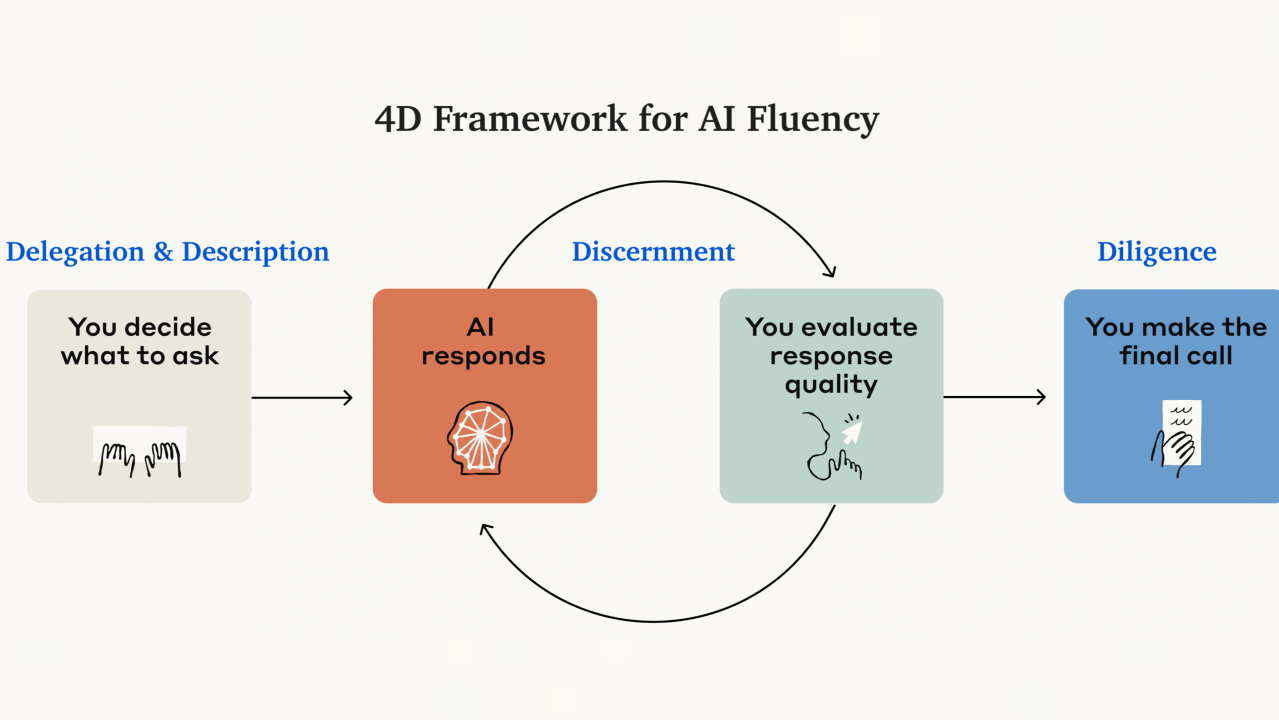
    Diagram of the 4 Ds of AI Fluency framework: Delegation and Description (you decide what to ask), AI responds, Discernment (you evaluate the response quality), and Diligence (you make the final call).
    The 4D Framework for AI Fluency.

    1. Delegation — knowing what to hand over

    Delegation is deciding which parts of a job to give to AI and which to keep for yourself. It’s a balancing act between getting things done faster and keeping the bits that genuinely need your judgement.

    What it looks like in practice:

    • You can look at a task and split it sensibly — “AI drafts this, I decide that.”
    • You know which tools are actually suited to the job, rather than reaching for the same one out of habit.
    • You hold on to the decisions that carry real weight — pricing, people, anything with your name on it.

    The goal isn’t to hand over everything. It’s to hand over the right things.

    2. Description — briefing it clearly

    Description is communicating what you actually want. Anthropic reframes “prompting” as a plain professional skill: being clear. It’s the same skill that makes you good at briefing a freelancer or a new team member — and the good news is anyone can learn it.

    What it looks like in practice:

    • You give context, not just commands — who it’s for, what it’s replacing, what “good” looks like.
    • You describe the outcome you want, not just the task.
    • When the first answer misses, you adjust the brief rather than giving up on the tool.

    A vague brief gets a vague result. A clear one gets something you can actually use.

    3. Discernment — judging what comes back

    Discernment is treating every AI output as a strong first draft, never a finished product. And here’s the catch: the better AI gets, the more this matters. As outputs become more polished, it gets harder to spot where they’re quietly wrong — so your job shifts from making the work to evaluating it.

    What it looks like in practice:

    • You spot when AI has confidently stated a statistic or “fact” it couldn’t possibly have checked.
    • You notice when the tone is technically correct but sounds nothing like you — and you know how to fix it.
    • You know which outputs to use as-is, which to edit, which to send back for another go, and which to bin entirely.

    The polish is the trap. Stay sceptical.

    4. Diligence — staying responsible

    If delegation is about judgement, description about clarity, and discernment about evaluation, then diligence is about responsibility. It’s making sure your use of AI is honest, ethical and appropriately careful.

    What it looks like in practice:

    • You’re open about where AI contributed to a piece of work.
    • You keep track of which tools and versions you used.
    • You document the collaboration when it matters — for clients, for compliance, or just for your own records.

    You stay accountable for the output, because you are.

    Why this matters more, not less, over time

    It’s tempting to assume that as AI gets smarter, you can relax. The opposite is true. Smarter AI produces work that looks right more often — which makes the human skills of judging, checking and owning the result more valuable, not less. Fluency isn’t a phase you pass through and leave behind; it’s the thing that keeps paying off.

    Where to start this week

    Pick one task you’d normally do from scratch. Then run it through the four:

    • Delegate — is this a good one to hand over? Which parts stay with you?
    • Describe — brief it properly. Context, audience, what “good” looks like.
    • Discern — read the result like a sceptic. What would you change?
    • Diligence — would you be comfortable explaining how this was made?

    Do that a handful of times and it stops being a checklist and becomes a habit. That’s fluency.


    This is exactly the kind of hands-on, practical AI thinking we help UK businesses build at Breezi. If you’d like more like this, the Tuesday Memo lands in your inbox each week — short, useful, no jargon.

    Framework adapted from Anthropic’s “4 Ds of AI Fluency,” developed with Rick Dakan and Joseph Feller. Read the original article.

  • Claude Fable 5 is here. What actually changes for your business

    Claude Fable 5 is here. What actually changes for your business

    Live · 9 June 2026
    Article

    Claude Fable 5 is here. What actually changes for your business

    Anthropic launched its most capable model today. We built this page with it. Here is what is real, what to ignore, and what it actually means if you run a UK business.

    5 min read · By the Breezi Ai team
    Available now in Claude Code$10 / $50 per million tokens
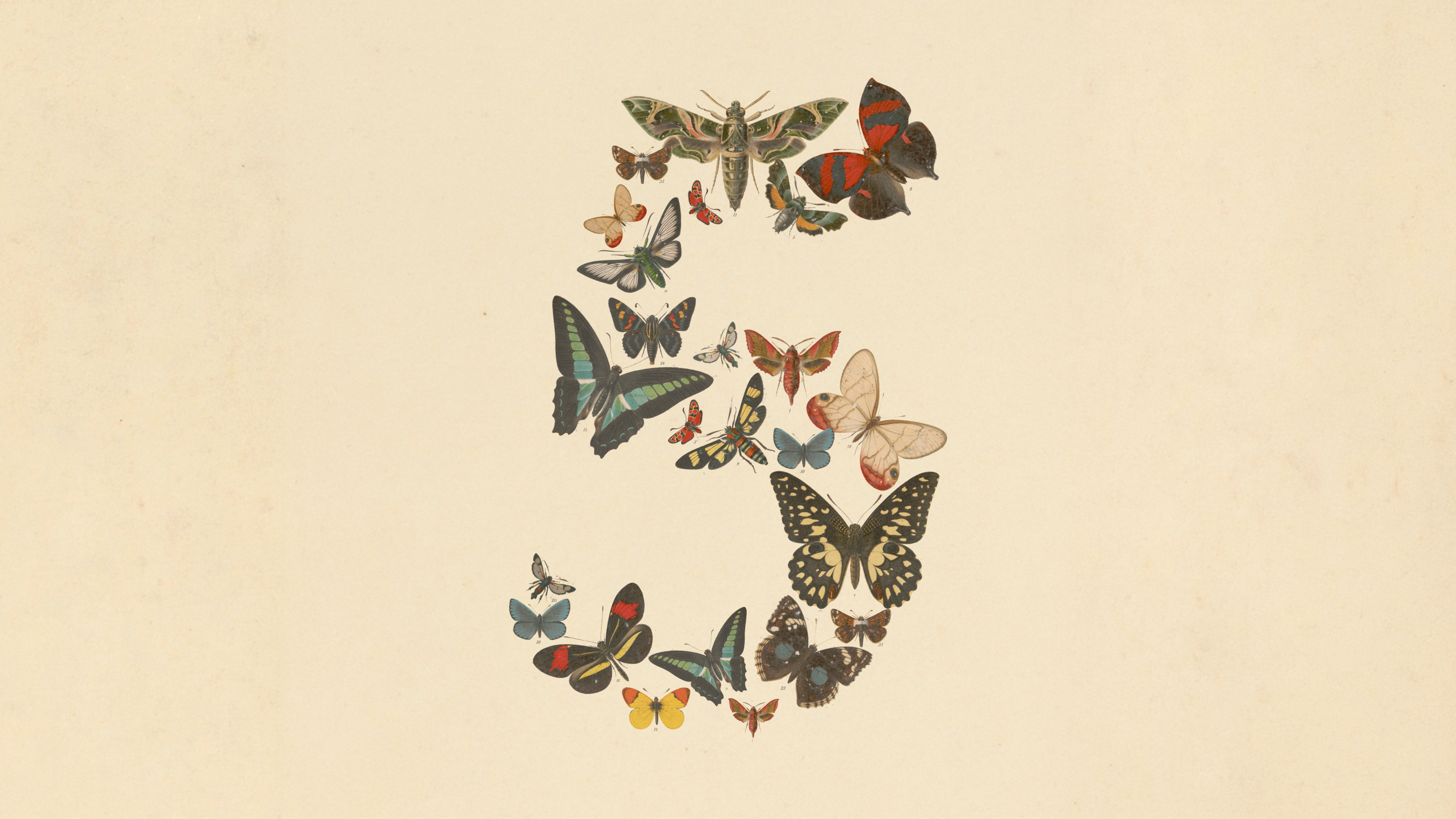
    Anthropic's launch artwork for Claude Fable 5: the number five formed from dozens of illustrated butterflies and moths on a cream background.
    The number five, in butterflies. Anthropic’s launch image for Claude Fable 5 and Claude Mythos 5. Source: Anthropic.

    What launched, in plain English

    On 9 June 2026 Anthropic released Claude Fable 5. It calls it the most capable model it has ever made generally available, and says it leads on nearly every benchmark it tested. The longer and messier the task, the further ahead it pulls. Fable 5 is available now inside Claude Code and across Claude, priced at $10 per million input tokens and $50 per million output tokens.

    There is a second model in the same announcement, Claude Mythos 5. It is the same underlying model with some safety limits removed, handed to a small group of cyber defenders and, soon, a few biology researchers. Unless you run critical national infrastructure, Mythos 5 is not for you, and that is the point. Most of the launch is about the very top end. The part that touches your week is smaller, and more useful.

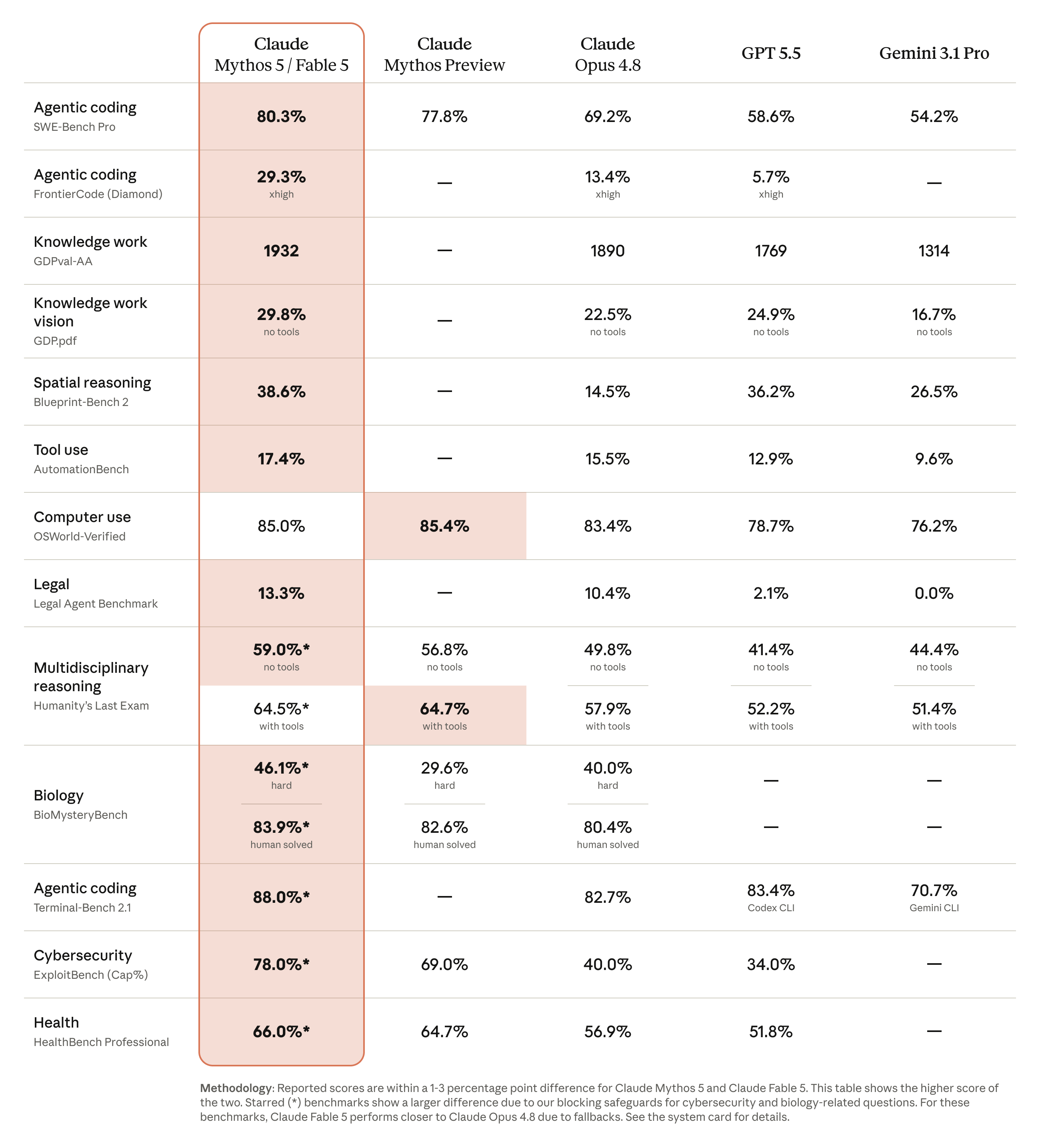
    Where Fable 5 lands on the work you might actually hand it

    Anthropic’s published scores, 9 June 2026. Higher is better. These are hard tests, so the numbers are low by design. What matters is the gap, and it widens as the task gets longer.

    Claude Fable 5 Claude Opus 4.8 GPT 5.5
    Agentic codingSWE-Bench Pro
    80.3%
    69.2%
    58.6%
    Computer useOSWorld-Verified
    85.0%
    83.4%
    78.7%
    Spatial reasoningBlueprint-Bench 2
    38.6%
    14.5%
    36.2%
    Long, hard codingFrontierCode, Diamond
    29.3%
    13.4%
    5.7%

    Selected non-safeguarded benchmarks from Anthropic’s comparison table. Cyber and biology scores are left out on purpose: on those topics Fable 5 hands the question to Claude Opus 4.8, so they do not reflect what you would get.

    What this actually means for your business

    Forget the leaderboard for a second. The change that matters is not a percentage. It is that the model can now hold a longer, messier job without losing the thread, and check its own work before it hands it back. Anthropic says Stripe used it to run a code migration across a 50 million line codebase in a day, work it reckons would have taken a team over two months by hand.

    You are not migrating a codebase. But the same trait, holding a big task from start to finish, is what turns “draft me an email” into “sort out my whole month-end reporting process”. Bigger jobs, handed over once, finished without hand-holding.

    Here is the honest part. A more capable model raises the ceiling. It does not tell you what to point it at. Most businesses will open Fable 5, ask it the same three things they asked the last model, and decide not much changed. The gain is real. It only shows up in the workflow you build around it. That is the actual job, and it is the gap Membership exists to close.

    Proof, not a slide

    We built this page with it

    This article, the layout you are reading it in, the chart that animates as it loads, the code behind all of it, were built with Claude inside Cowork. The same family of models the announcement is about, pointed at a real task, finished and shipped the same day. That is what we mean when we say we help UK businesses actually use Ai. Not a slide about it. The thing itself.
    What to ignore, for now

    The cyber and biology capabilities, the protein design, the model playing Pokémon from raw screenshots. Genuinely impressive, and completely irrelevant to your Monday. When Fable 5 touches one of those high-risk topics it quietly hands the question to Claude Opus 4.8 instead. Anthropic says that fallback happens in under 5% of sessions, so for ordinary business work you will not notice it.

    One thing worth a diary note rather than your attention. At launch, Fable 5 is included on Claude Pro, Max and Team plans at no extra cost until 22 June 2026. From 23 June it runs on usage credits until capacity settles. If you want to try the top model while it is free, the window is now, not next month.

    Anthropic's full benchmark table comparing Claude Mythos 5 and Fable 5 against Claude Mythos Preview, Claude Opus 4.8, GPT 5.5 and Gemini 3.1 Pro across coding, knowledge work, vision, biology, cybersecurity and health.
    The full picture for anyone who wants it. Starred rows differ because of the cyber and biology safeguards. Source: Anthropic, 9 June 2026.
    30%
    Up to 30% of working hours, reclaimed every month by Lahat Creative inside Breezi Membership

    Same idea, fewer words. The win was never the model. It was the set of workflows built around it, then left running. A new model makes that work better. It does not do it for you.

    Want this pointed at your business?

    Membership gives you a senior Ai team for a few bespoke hours every month. You bring the job. We build the workflow, in Fable 5 or whatever turns out to be best for it, and leave you something that keeps working after we step back.

    Source: Anthropic, Claude Fable 5 and Claude Mythos 5, 9 June 2026. Benchmark figures and the Stripe example are Anthropic’s own. Written and built with Claude in Cowork.